Rama Krishna Public Inter College — School CMS Platform
How we replaced phone-and-paper admissions at Rama Krishna Public Inter College with a Next.js platform the school runs daily without a developer on staff.
At a glance
40%
More admission enquiries
99
Lighthouse score
0
Dev hours/month for content
- Client
- Rama Krishna Public Inter College (RKPIC)
- Industry
- Education · K-12 (UP Board)
- Duration
- 6 weeks build · ongoing CMS
- Location
- Raebareli, Uttar Pradesh
Situation
RKPIC is a UP Board school in Raebareli serving 10,000+ students since 2009 — a school with real institutional presence, real history, and real word-of-mouth in the district. What it didn't have was any digital surface area. Admissions ran on phone calls. Results went up on paper notice boards inside the campus. Photos from cultural events sat in a WhatsApp group that parents couldn't easily search. Prospective parents in Lalganj or Salon couldn't see the school online before deciding whether to make the 30-minute drive to visit.
The cost of this wasn't theoretical. Two specific failures showed up repeatedly. First, missed admission enquiries — parents who would have called were searching Google, finding nothing, and quietly going to a competitor with a worse but findable website. Second, recurring administrative load — the front desk was answering the same five questions ("admission process", "fee structure", "exam dates", "results", "transport") over and over because there was no canonical place to point parents to.
Task
The school's leadership wanted three things, in order:
- A modern public website that actually ranked when parents searched "school in Raebareli" or "RKPIC admission".
- A way to update content — admissions notices, gallery photos, results, faculty profiles, news — without depending on a developer or a monthly retainer. They had been quoted ₹15k/month by other vendors for "website updates" and rejected the model.
- Mobile-first delivery, because 80%+ of their parent audience uses entry-tier Android devices and patchy 4G.
The brief explicitly said: we don't want to call you every time we add a notice. That single sentence reshaped what we built.
Action — Public Site
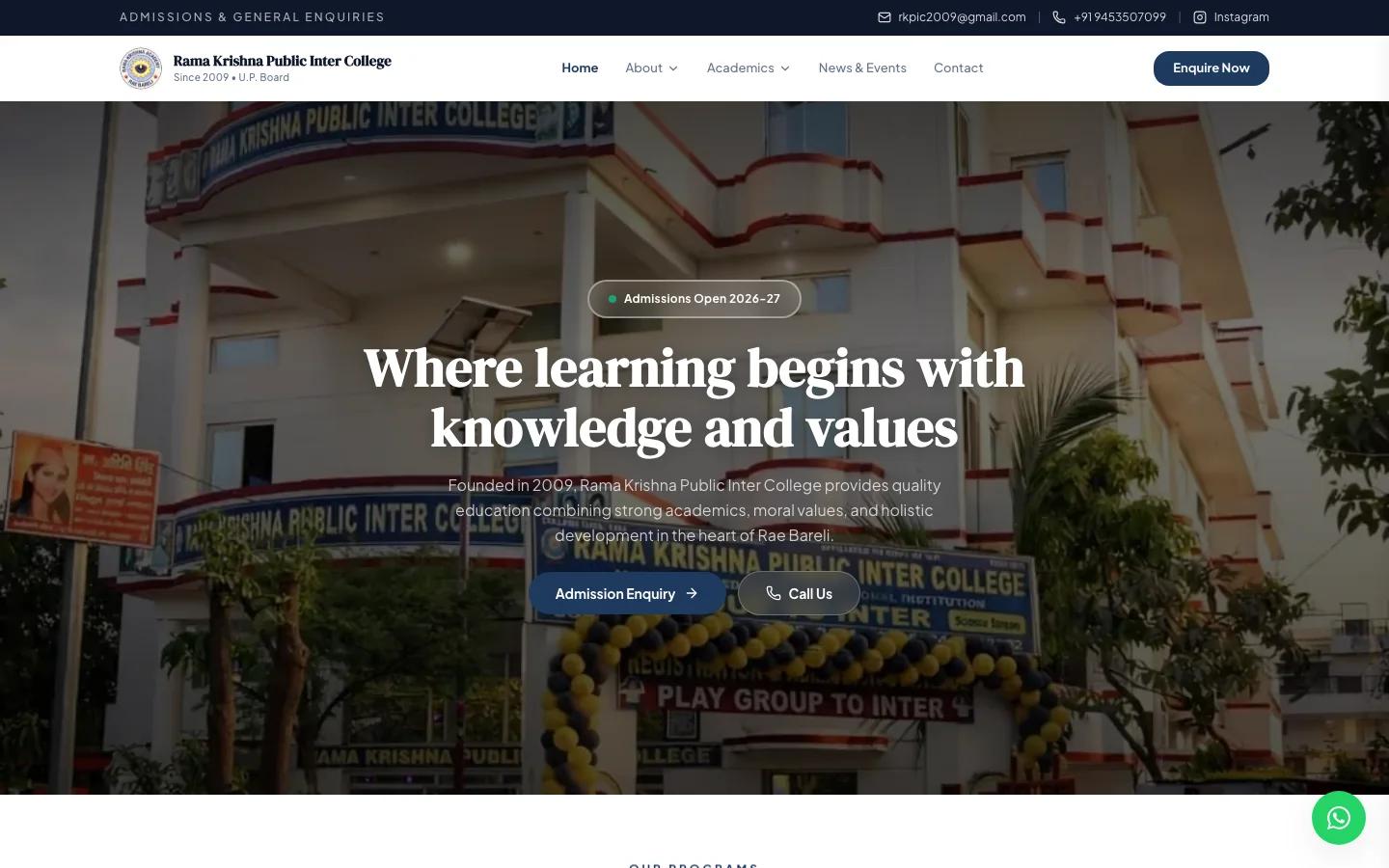
The public site at rkpic.org is built on Next.js + Tailwind CSS, deployed on Vercel. The architecture is intentionally boring: SSR/SSG pages, image optimization via next/image, font subsetting via next/font, and Lighthouse 95+ as a delivery floor (it shipped at 99). What's interesting isn't the stack — it's the information architecture, which we rebuilt from scratch around the actual decisions parents make.
Top-level navigation maps to the five questions the front desk was answering 50 times a week:
- Admissions — process, fee structure, downloadable forms, online enquiry form.
- Academics — programs (UP Board curriculum), faculty profiles, schedules.
- Gallery — photos and event reels from cultural and sports days, organised by year and event.
- News & Events — announcements, exam schedules, results when published.
- Contact — Google Maps embed, phone, WhatsApp deep-link, transport route map.
Bilingual content was non-negotiable. The site ships English-first with Hindi-first content for sections where Hindi is the dominant audience language (admissions, news, results). Devanagari typography uses Noto Sans Devanagari with line-height adjustments tuned for parent-readability on small screens.
The enquiry form is the conversion engine. It feeds into both an internal admin queue and a WhatsApp Business notification to the admissions team — most parents follow up on WhatsApp anyway, so meeting them there cut response time from 2–3 days (phone-tag with the desk) to under 4 hours.
Action — Admin Control Panel
This is the section that makes the case study a case study rather than a website launch. RKPIC ships with a full admin dashboard — a school-CMS platform that lets the administrator manage every public-site surface without touching code, without a developer retainer, and without learning HTML.
The admin platform handles:
- Notices and announcements — publish a notice in 30 seconds with optional Hindi translation, an attachment (PDF), and an expiry date. Notices auto-archive when they expire so the public site stays current without manual cleanup.
- Gallery management — upload event photos in batches, organise into albums by year and event, set cover images, and reorder via drag-and-drop. Image optimization (WebP conversion, multiple sizes for responsive delivery) happens automatically at upload — administrators never think about file formats.
- Faculty profiles — add or update faculty members with photo, qualifications, subject specialisation, and joining year. Profiles appear on the academics page in the order set in the dashboard.
- News and events — long-form announcements with rich text, embedded images, and a publish/draft state. Events have a date/time and location field that flows into structured data on the public site (Event schema) for richer Google search results.
- Admissions enquiry queue — every submission from the public form lands here with parent name, child age, class, contact, and the desk team's notes. Status flags (new / contacted / enrolled / declined) make it usable as a lightweight CRM without buying a separate tool.
- Results publication — class-by-class results with downloadable PDFs and a structured-data overlay so search snippets show "Results 2026 — Class 10" instead of generic page titles.
Authentication and roles. The dashboard uses email + password auth with role-based permissions: principal-level (everything), administrative staff (notices, gallery, news, enquiries), and faculty (their own profile only). Audit logs capture every change with timestamp and user, so when a notice gets edited there's a record of who and when.
Image upload pipeline. Parents and faculty submit photos in everything from 0.3MB to 12MB. The dashboard accepts whatever's uploaded, runs WebP conversion server-side, generates four responsive sizes (mobile, tablet, desktop, OG), and serves via Vercel's CDN with cache headers tuned for the rare-edit / high-read pattern of school content.
Why this section is the centrepiece. Most school websites in India ship as static brochures and quietly stop being updated. The reason isn't laziness — it's that updates require a developer, developers cost money, and budget that should be funding teachers gets routed to "website maintenance" instead. The dashboard makes ongoing operation a school staff task instead of a vendor task. Two years post-launch, RKPIC has logged hundreds of content changes from admin staff and zero developer hours billed for updates.
Key Technical Decisions
- Next.js + Vercel over WordPress. Specifically rejected WordPress because plugin sprawl, security debt, and the "every change needs a developer" trap were the exact problems the school was hiring us to escape.
- Custom dashboard over a headless CMS. Sanity, Contentful, or Payload would have given us 80% of the admin UI for free — but the remaining 20% (admissions queue, results publication, role-based permissions, audit logs, school-shaped vocabulary) was the part the school actually cared about. A custom dashboard built with the public site means admin staff use the same vocabulary they already use in person.
- Hindi-first where Hindi-first wins. The CMS itself has Hindi UI labels for sections where the editor team prefers Hindi (notices, news). No code-switching while authoring. The 30-minute training session covered both interfaces because half the team uses each.
- Mobile-first on a real budget. Tested on actual entry-tier Android devices (under ₹15k retail) on 4G inside the school. Lighthouse-on-laptop is one signal; a real phone in real hands inside the campus is the only one that matters.
Results
After the build went live and through the first admission cycle:
- 40% increase in admission enquiries quarter-over-quarter, attributable to organic-search visibility and the WhatsApp-deep-linked enquiry form.
- 99 Lighthouse score on the public site (mobile + desktop), with Core Web Vitals well inside Google's "good" threshold for every metric.
- 2× parent engagement measured via gallery views, news article reads, and notice opens — the gallery alone serves 5,000+ photo views in a typical month.
- Zero developer hours/month for content updates. Two years post-launch, RKPIC has shipped hundreds of notices, gallery uploads, and news pieces without a single developer involved.
- Reduced front-desk load. The five most-asked questions are now answered on the website, freeing up admissions staff to focus on enquiry follow-up rather than information delivery.
What we'd build the same way again
The piece that compounded was the dashboard, not the public site. A beautiful school website that gets stale in six months is a worse outcome than an OK school website that stays current for five years. For schools, hospitals, and SMBs in this exact shape — institution with real presence, no engineering team, multiple non-technical content editors — the right answer is almost always: ship a usable public site and invest in the admin layer that keeps it alive.
This is now Vellumarc's reference architecture for the school and hospital vertical. Future RKPIC-shaped engagements start from this codebase rather than from scratch.
Want this for your school or institution?
If you run a school, college, hospital, or institution that has the "we need a website but the last one died because we couldn't update it" problem — this is exactly the engagement we're built for. Book a free audit and a senior engineer will respond in 48 hours with a written scope and timeline.
“We used to call parents back from a notebook and update notice boards by hand. Now admissions, results, gallery, and notices all go up in minutes — and the website actually shows up when people search.”